
Picking a YouTube channel name feels small at first… until you realise that one little line of text will appear on every video, every thumbnail, every collab, every search result – basically, everywhere your brand exists online. A good name can pull clicks, build trust, and silently “sell” your vibe before a single second of your video even plays. A bad one? People scroll right past it. This is where a YouTube channel name generator can save weeks of overthinking and give you a shortlist of catchy, unique, and brandable names in minutes.
A modern youtube channel name generator blends AI, keyword logic, and branding principles to turn your niche, style, and personality into real, usable name ideas that can grow with you over years, not weeks.
What Is a YouTube Channel Name Generator and Why Creators Rely on It?
It is a tool (often AI-powered) that takes a few inputs from you—like niche, keywords, tone, or your own name—and then suggests creative, relevant channel names you can actually use. Think of it as a brainstorming partner that never gets tired and doesn’t judge your “cringy” ideas.
Instead of staring at a blank page, creators use these tools for:
- Fast idea generation when they feel stuck.
- Exploring different branding angles (funny, professional, mysterious, luxury, etc.).
- Checking basic name availability so they don’t fall in love with a name that’s already taken.
For new and even established creators, the real win is clarity. A youtube channel name generator helps turn a vague idea like “I want to teach coding in Hindi” into options like “CodeWithDesiLogic” or “HindiDevLab” – names that instantly tell viewers what to expect while sounding like a real brand.
17 Best YouTube Channel Name Generator Tools (Expert Review)
Below are 17 of the best tools to use as your youtube channel name generator, along with strengths, ideal users, and practical use‑cases.
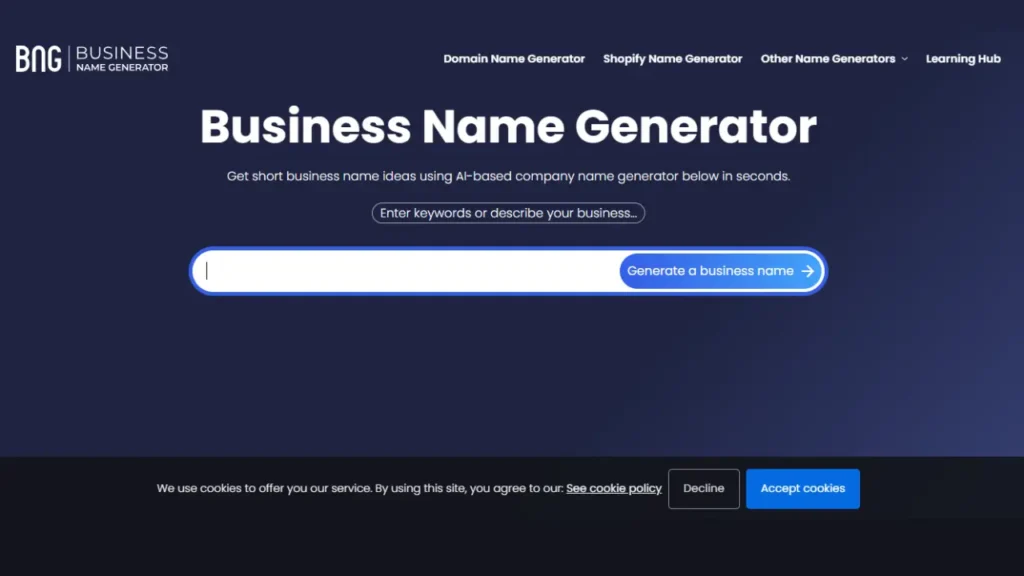
1. Business Name Generator
Business Name Generator offers a dedicated YouTube name generator that balances creativity, relevance, and basic availability insights.
Best for:
Creators who want structured suggestions with both basic and advanced configuration.
Why it’s powerful:
- Lets you enter keywords and choose between simple or more advanced wizard modes.
- Produces a wide variety of name styles—from descriptive to brandable.
- Often pairs suggestions with domain availability options so you can plan beyond YouTube.
Use it like this:
- Type “budget travel vlogs,” select a more detailed view, and refine until you get options like “FrugalTrailVlogs” or “BackpackBudgetTV.”
- Shortlist 5–10 names, check YouTube and domain availability, and then test them aloud.
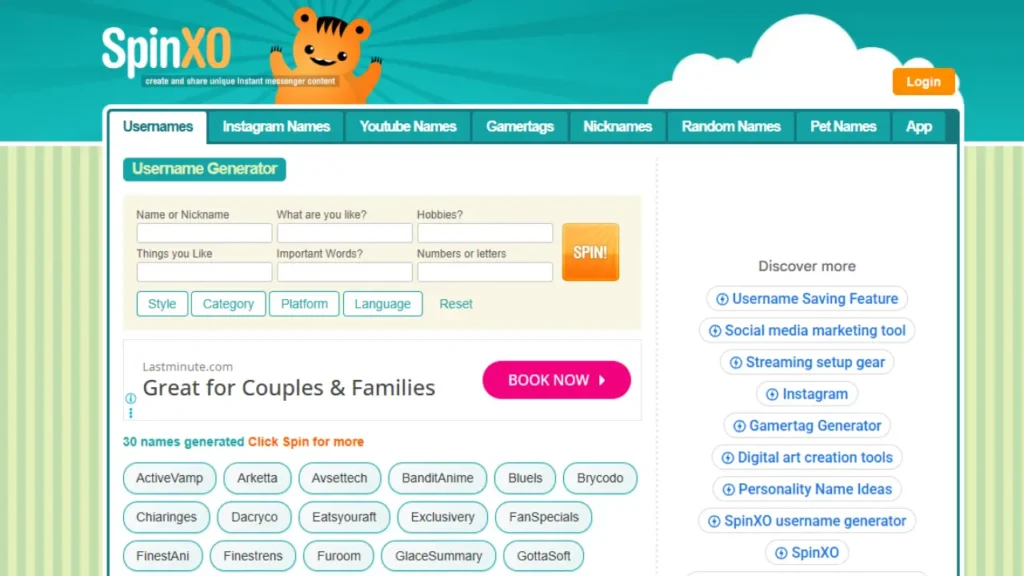
2. SpinXO – Personalized & Interactive
SpinXO has been a long‑time favorite for username and channel name ideas because it makes you fill multiple fields (name, niche, hobbies, things you like) and then creates personalized combinations.
Best for:
Creators who want interactive, personality‑driven options.
Key features:
- Includes personal info inputs (nickname, hobbies, etc.) to create more unique names.
- Ideal for vlogging, lifestyle, gaming, and personality‑driven channels.
- Generates multiple “spins” so you can keep refreshing versions quickly.
Example:
If you enter your nickname “Sid,” niche “tech reviews,” and interests “gadgets, deals,” SpinXO might give combinations like “SidTechDeals,” “GadgetSid,” or “DealDroidSid” that feel more like you.
3. Namelix – AI-Based
Namelix is a more advanced, AI‑driven name generator originally built for businesses and startups, but it works extremely well.
Best for:
Creators who want clean, brand‑ready names that could grow into a full company.
Strengths:
- Uses AI to create short, modern, brandable names.
- Lets you choose name styles (real words, made‑up words, compound words, etc.).
- Often suggested alongside logo ideas, nudging you towards proper brand identity.
If you’re planning a long‑term content brand (courses, apps, merch), Namelix is ideal because it pushes you towards names that could sit nicely on a website or product line.
4. Namechk – Availability-Focused
Namechk is less of a pure “name idea” generator and more of an availability scanner—but that makes it invaluable in your process.
Best for:
Creators who already have a shortlist and now want to see where that name is free.
What it does:
- You enter a name idea.
- It quickly scans across multiple domains and social networks to show what’s taken and what’s free.
- Helps you avoid the pain of inconsistent handles.
Use any youtube channel name generator free to brainstorm 10+ names, then run your favorites through Namechk to choose the ones that give you the best cross‑platform branding potential.
5. Wix Name Generator
The Wix name generator is primarily meant for website and brand naming, but its AI‑driven naming engine makes it very useful.
Best for:
Creators who plan to eventually build a website (portfolio, blog, or store) alongside their channel.
Advantages:
- Suggests creative names aligned to industry and tone.
- Pairs suggestions with website options if you decide to build on Wix.
- Works well for coaches, educators, freelancers, agencies, and businesses using YouTube as a marketing channel
6. Shopify Brand Name Tool
Shopify’s brand name tool is a simple but effective youtube channel name generator free option if your channel is business, store, or product‑oriented.
Best for:
- E‑commerce channels, product review channels, dropshipping channels, D2C brands using YouTube.
Why it’s useful:
- Generates brand‑style names tied to commerce and product categories.
- Helps you think beyond YouTube—into product lines, stores, and merchandising.
If your vision is “brand + channel + shop,” this tool keeps everything aligned.
7. TubeBuddy Name Generator
TubeBuddy is a well‑known YouTube optimization suite, and its channel name ideas tools are designed specifically with YouTube creators in mind.
Best for:
Creators who already use TubeBuddy for SEO, tags, and optimisation.
Benefits:
- Suggests names with YouTube’s ecosystem in mind.
- Integrates into a toolkit you might already use for titles, tags, and thumbnails.
- Great when you want to keep everything inside a single creator workflow.
8. Looka Brand Generator
Looka is a branding platform that combines logo design, brand kits, and name ideas.
Best for:
Creators who want a polished, corporate‑grade identity from day one.
Why it stands out:
- Generates names with a visual brand angle in mind.
- You can immediately see how that name might look in a logo or on mockups.
- Perfect for B2B channels, consulting brands, or professional education channels.
9. Kparser Name Ideas Tool
Kparser is primarily a keyword research tool, but it also helps generate name ideas by expanding your root keywords into thousands of related phrases.
Best for:
Creators who care deeply about SEO and keyword positioning.
Use it this way:
- Enter your base keyword: “coding for beginners,” “budget travel,” “Indian recipes,” etc.
- Study the long‑tail suggestions Kparser gives you.
- Use those as raw material for naming: “BudgetTravelRoutes,” “BeginnerCodeMentor,” “DesiRecipeDiaries,” etc.
You’re basically combining a keyword tool with the creativity of your own brain.
10. Cool Name Ideas
Cool Name Ideas focuses on combining your niche keywords with smart naming patterns to create clean, descriptive names.
Best for:
Channels that want clarity + a bit of creativity, especially in English‑speaking markets.
Advantages:
- Uses category‑specific templates and patterns.
- Ensures the name sounds “cool” but still communicates what the channel does.
- Helpful for tutorials, services, or niche content.
11. WebSite Planet Name Tool
The WebSite Planet name tool is simple but effective—a straightforward for quick ideas.
Best for:
Beginners who just want a fast list of names without over‑optimising.
Pros:
- Very easy to use.
- Good for initial brainstorming or when you’re stuck on a single concept.
- You can run multiple rounds with different keywords to explore wider directions
12. Zyro Name Generator
Zyro (now part of Hostinger’s ecosystem) has an AI‑driven name generator that works nicely for channels.
Best for:
Creators who want short, modern names that could easily extend into brands or SaaS‑like identities.
Strengths:
- AI combines words in interesting, brand‑style ways.
- Often produces names that sound like real products or apps.
- Suitable for tech, startups, productivity, and design‑focused channels.
13. DomainWheel
DomainWheel is geared toward finding domains, but it doubles as an excellent focused on SEO and availability.
Best for:
Creators serious about building both a channel and a website with strong search presence.
Features:
- You enter keywords. DomainWheel proposes domain‑friendly names.
- It also shows available domains and related variations.
- Many of the suggestions work beautifully as channel names, especially if you want to rank with supportive blog content later
14. Panabee
Panabee is more playful and visual, and it’s great when you want to break out of a creative block.
Best for:
Vloggers, creative channels, casual gaming, lifestyle, and youth‑centric niches.
Why creators like it:
- Shows name ideas in a fun, visual way.
- Suggests twists, misspellings, and creative mash‑ups.
- Good when you want something quirky but still readable.
15. NameMesh
NameMesh groups name suggestions into categories like “Common,” “New,” “Short,” “Fun,” and “SEO.”
Best for:
Those who like to see names organised by style and brand direction.
Benefits:
- You get a broad overview of different naming philosophies.
- The SEO category is helpful if you want slight keyword emphasis.
- Helps you see whether you naturally lean toward short, fun, or descriptive names.
16. ChatGPT
Tools like ChatGPT themselves function as a powerful youtube channel name generator ai free option when you provide clear instructions.
Best for:
Creators who want conversational brainstorming and iterative refinement.
What makes it powerful:
- You can give detailed prompts: niche, audience, language, tone, content style, and branding preferences.
- You can refine in real time: “Make it shorter,” “Avoid the word ‘Tech’,” “Give Hindi‑English mixed options,” etc.
- You can also ask for multiple categories like professional, fun, mysterious, or luxury.
The key is to treat it like a creative collaborator: share your story, who you are, and where you want the channel to be in 3–5 years.
17. Brandroot
Brandroot specialises in premium brand names—often including domains and logo concepts, making it a serious option for long‑term, high‑value brands.
Best for:
Creators planning a serious business brand, agency, or company around their channel.
Advantages:
- Curated, high‑quality brand names that already “feel” like real companies.
- Often paired with domain and visual identity options.
- Good for finance, SaaS, consulting, health, and other authority‑driven niches.
If your vision is far bigger than “just” a YouTube channel, Brandroot can help you pick a name that stands up in boardrooms and investor meetings too.
How it Works Behind the Scenes
Most modern generators work in three broad steps:
Input collection
- You enter keywords (e.g., gaming, fitness, recipes).
- Sometimes you choose a tone: funny, professional, edgy, cute, luxury, minimal, etc.
- Some tools also ask for your name, nickname, location, or favorite words.
Processing & idea generation
- AI or algorithmic models analyze your inputs and match them with patterns that work well in brand names.
- They combine root words, add meaningful prefixes/suffixes, mash two words together, or use alliteration and rhythm to create catchy phrases.
- Some ai tools also consider length (shorter is usually better), clarity, and memorability.
Filtering & availability checks
- Many tools filter out names that are obviously taken or too close to existing well‑known brands.
- Some also check domain names and sometimes social media handle availability, so you can align your YouTube and website branding.
Under the hood, a youtube channel name generator ai free tool is mixing branding best practices, keyword logic, and a huge internal vocabulary to spit out options that “sound” like real brands instead of random word salads.
Benefits of Using for Branding
When used properly, It can becomes a real asset for long‑term branding, not just a shortcut.
Key benefits include:
- Speed with direction
Instead of spending weeks thinking of a name, you can explore hundreds of ideas in minutes—without losing alignment with your niche. - Brandability
Good generators try to optimise for names that are easy to pronounce, spell, and remember—core traits of strong brands.
This directly impacts word‑of‑mouth: if a viewer can’t tell a friend your name without spelling it out letter by letter, you lose organic growth. - Fresh angles you wouldn’t think of
It will combine terms, synonyms, and wordplays you might not naturally think of. This is especially powerful if you feel every good name is “already taken.” - Scalability and professionalism
Many creators start “just for fun” and regret having chosen a childish or overly narrow name when their content evolves. A carefully chosen generator‑assisted name can grow with you—from hobbyist to full‑time bran
Common Mistakes Creators Make
Skipping it doesn’t doom you, but it makes certain mistakes far more likely:
- Overly generic names
Names like “Gaming World,” “Tech Reviews,” or “Cooking Channel” are almost impossible to rank or remember because they blend into thousands of similar names. It can push you toward more distinctive variations. - Hard‑to‑spell or confusing names
Complex spellings, unnecessary numbers, or random characters make it hard for people to search you again. Many tools now gently nudge you towards simpler, more brandable structures. - Ignoring keyword and niche alignment
Your name doesn’t have to be an exact keyword, but having a hint of your niche (“Kitchen”, “Dev”, “Fit”, “Finance”, “Vlogs”, “Shorts”) helps both algorithms and viewers. Generators usually keep this alignment in mind. - No availability research
Choosing a name without checking YouTube, domains, and socials can backfire later when you want to expand into a website or merch line. A good youtube channel name generator free solution can pre‑check or at least encourage you to verify availability early
Key Factors to Consider Before Choosing
Not all generators are equal. Before you rely on one, you need to look at a few critical aspects that directly affect both creativity and long‑term brand strength.
Relevance & Niche Targeting
It should respect your niche and content direction.
Look for tools that:
- Allow niche‑specific inputs (e.g., “gaming,” “ASMR,” “productivity,” “K‑pop reactions”).
- Let you shape the tone: fun, professional, dark, luxury, minimalist, etc.
- Provide options that clearly hint at what your channel is about.
For example, a tech channel focused on budget smartphones should get names like “BudgetTechLabs” or “FrugalPhoneFinds” instead of vague options like “SmartWorld Hub.” The more precisely you describe your content and audience to the generator, the more aligned the results.
Uniqueness and Brandability
Uniqueness is not just about being different—it’s about being rememberably different.
A high‑quality youtube channel name generator ai will help with:
- Short, punchy names instead of long, clunky phrases.
- Simple spelling, ideally with one obvious spelling and pronunciation.
- Emotional or visual hook – words that trigger an image, a feeling, or a clear idea (e.g., “Forge,” “Lab,” “Nest,” “Vault,” “Kitchen,” “Arena”).
Brandability checklist when using any generator:
- Can someone remember it after hearing it once?
- Does it look clean on a thumbnail, logo, or banner?
- Does it sound like something you’d be proud to say in an intro for years?
Generators that add subtle creativity—rhymes, alliterations, blended words (like “TechTonic,” “CookCrafted,” “StudySphere”)—are especially valuable.
SEO & Keyword Optimization From it
Your channel name alone will not rank your videos, but it does help contextualise your brand for YouTube and Google.
A good free tool can:
- Suggest names that include niche keywords in a natural way:
- “CryptoClarity,” “KitchenChronicles,” “ReviewRadar,” “EduBridge,” etc.
- Help avoid over‑stuffing: “Best Tech Review Unboxing Smartphone Channel” looks spammy and untrustworthy.
SEO‑smart tips:
- Include one strong hint of your niche in the name (e.g., “Tech,” “Kitchen,” “Vlogs,” “Gaming,” “Finance”).
- Keep it clean and human; your primary SEO work will still come from titles, descriptions, and content, not the channel name alone.
Why Domain Availability Matters
Even if you don’t plan a website today, locking in your domain early is one of the smartest branding moves you can make.
Reasons domain checks matter:
- Future‑proofing – Later, when you want a blog, course site, or merch store, owning YourChannelName.com instantly amplifies your authority.
- Brand protection – If your channel blows up, you don’t want someone else grabbing your matching domain and confusing your audience.
- Cross‑platform consistency – A name that’s free on YouTube, domain registrars, and major social platforms gives you a consistent presence everywhere.
Some tools (like Namechk, DomainWheel, and others in the list below) directly integrate these availability checks so you can make smarter, long‑term decisions from day one
How to Use These tools effectively
Simply clicking “Generate” and picking the first option is not strategy—it’s gambling. To use any tool to its full potential, you need a process.
Step-by-Step Guide
Define your niche clearly
- Who are you serving? (Gamers, students, busy moms, founders, etc.)
- What content will you create in the next 12–24 months? Tutorials, reviews, stories, shorts, vlogs?
Pick 2–3 generator tools
- Combine one AI‑heavy tool (like Namelix, ChatGPT, Zyro) with one availability‑oriented tool (Namechk, DomainWheel) and one general YouTube‑focused option (Business Name Generator, TubeBuddy).
Prepare a keyword + vibe list
- Keywords: “budget travel,” “tech reviews,” “UPSC tips,” “Minecraft,” “ASMR,” “recipes,” etc.
- Vibes: friendly, sarcastic, luxury, minimal, desi, global, etc.
- Feed both into your chosen youtube channel name generator ai free tools.
Generate at scale, shortlist with intention
- Collect 30–50 ideas.
- Instantly discard anything hard to spell, cringy, or legally risky (too close to big brands).
- Shortlist 10–15 names that are: short, clear, and niche‑aligned.
Check availability & conflicts
- Run your shortlist through YouTube search, domain tools, and social handle checks.
- Eliminate names that clash with established brands or are already used in your exact niche.
Test out loud and in context
- Say each name as if recording an intro: “Hey, welcome back to [Name]…”
- Visualise it on a thumbnail, banner, watermark, and potential merch.
Sleep on it, then decide
- Give yourself 24 hours.
- Look at the names fresh and pick the one that still feels strong, aspirational, and comfortable.
Tips to Get Better Results
Be specific in your inputs
“Gaming” is too broad; “competitive Valorant gameplay,” “Minecraft no‑commentary builds,” or “casual mobile games” gives better results.Use language, culture, or style to your advantage
For Indian creators, mixing English with Hindi or regional words (“Yaatra,” “Adda,” “Sutra,” “Gyaan,” “Mantra,” etc.) can create memorable hybrid names.Iterate around words you like
If you love “Forge,” “Lab,” “Nest,” or “Diaries,” run multiple generator rounds with those anchored in.Think long‑term content scope
Avoid names that lock you into one narrow topic if you know you’ll expand (e.g., not “OnlyiPhoneReviews” if you might later cover laptops and cameras too).
What to Avoid When Using a youtube channel name generator
Copy‑pasting without due diligence
Never pick a name without searching YouTube, Google, and social platforms for conflicts.Over‑optimising for keywords
Names like “Best Free PUBG BGMI Gaming Live Stream Channel” look spammy. Keep it human.Unnecessary symbols and numbers
Unless they’re integral to your brand (e.g., “24×7”), avoid random digits, underscores, and special characters.Legal and trademark risks
Avoid names closely resembling big brands, game titles, or registered trademarks. The generator is a helper, not a legal shield.
YouTube Channel Name Ideas by Niche (Using Generators)
To show how ai tools can work in real life, here are example patterns and approaches for common niches. Treat these as frameworks rather than exact names.
Gaming Channel Ideas
For gaming, you typically want energy, memorability, and sometimes niche specificity (game titles, genre, or playstyle):
- Competitive / Esports: Use words like “Arena,” “Clutch,” “Frag,” “Tactics,” “Legends,” “Valor,” etc.
- Casual / Fun: Words like “Playground,” “Noob,” “Chill,” “FunZone,” “Buddy,” “Squad.”
- Horror / Story Games: “Night,” “Lore,” “Echo,” “Phantom,” “Dark,” “Vault.”
Tell the generator:
“Give 20 gaming channel name ideas for casual mobile gaming content, fun tone, easy to pronounce, 1–2 words.”
Then refine:
“Now make 10 of those suitable for Indian audiences, mixing light Hindi/English elements.”
This is where a youtube channel name generator ai really shines in localisation and personality.
Tech & Review Channel Ideas
Tech and review channels benefit from trust and clarity.
Naming angles:
- Authority: “Lab,” “HQ,” “Insight,” “Review,” “Bench,” “Authority,” “Digest.”
- Budget‑focused: “Savvy,” “Frugal,” “Value,” “OnABudget,” “Deals.”
- Region‑specific: Add “India,” “Desi,” city names, or language hints if you’re region‑focused.
Prompt structure for tools:
“Niche: smartphone and gadget reviews under budget. Tone: trustworthy, friendly, Indian audience. Output: short names that hint at savings and smart buying.”
The generator will propose patterns that bring together money‑saving plus tech expertise—exactly what your audience is looking for.
Vlogging Channel Ideas
Vlog names often revolve around you—your personality, city, lifestyle, or life philosophy.
Ideas:
- Name‑centric: “[FirstName]Vlogs,” “[Nickname]Diaries,” “[FirstName]OnTheMove.”
- Theme‑centric: “DailyDetours,” “CitySideStories,” “SlowLifeJournal,” “MorningMiles.”
- Couple/family vlogs: “The [Surname]s,” “TwoWayJourney,” “MiniChaosCrew.”
When using it, give context:
- Are you travelling often or mostly in one city?
- Is it more cinematic, raw, funny, or educational vlogging?
- Do you want your real name included or not?
The more context you share, the more emotionally accurate the names become.
Cooking & Food Channel Ideas
Food channels do well with words that trigger senses and culture:
- “Kitchen,” “Bites,” “Flavors,” “Tadka,” “Masala,” “Feast,” “Diaries,” “Pan,” “Platter.”
- Regional / language hints: “Rasoi,” “Bhog,” “Zaika,” “GharKa,” “Street,” etc.
Tell the tool:
“Hindi + English mix. Home cooking, easy recipes, vegetarian focus. Tone: homely, warm, friendly.”
A good youtube channel name generator ai will then combine food words + emotional homely cues into names that feel like a kitchen you’d trust.
Education & Tutorial Name Ideas
Education channels need clarity and credibility.
Naming patterns:
- “[Subject]Mentor,” “[Topic]Simplified,” “[Topic]Hub,” “ExamPrepLab,” “SkillForge,” “Academy,” “Gyaan,” “Pathshala,” “Coach.”
Example prompt for a generator:
“YouTube channel for English grammar and spoken English for Indian students and job seekers. Tone: helpful, trustworthy, simple. Prefer 1–3 word names, some with Hindi/English mix.”
The tool can output names that sound like a friendly teacher rather than a corporate coaching factory, which is key for engagement and trust.
Checklist Before Finalizing Your YouTube Channel Name
Once you’ve used tools and have a strong candidate, run it through this final filter.
Double-Checking Generator Results
- Search on YouTube:
Type the exact name and similar variants. Check if someone in your niche already dominates that name. - Google search:
See if any major brand, company, or website is already using that name heavily. If yes, consider variants to avoid brand confusion. - Language & cultural check:
If you mix languages or use slang, make sure the word doesn’t have unintended meanings in major target regions.
Social Media Handle Verification
- Check availability on:
- X (Twitter)
- TikTok (if relevant)
- Facebook page
- LinkedIn (for professional/education brands)
Try to secure the same or very similar handle across platforms. Availability‑centric tools like Namechk make this step much faster by scanning across many networks in one go.
Testing Your Name for Long-Term Branding
Ask yourself:
- Can this name grow if my content expands a bit?
- Will I be comfortable saying this name on stage, in a podcast, or in a brand deal five years from now?
- Does it look clean in logo form? Try typing it in different fonts, caps, and styles.
- Can you imagine this name on merch—hoodies, mugs, bags?
Run a mini focus test:
- Share your top 3–5 names with friends, family, or your existing following.
- Ask which one:
- Sounds most professional.
- Is easier to remember.
- Feels most like “you” or your content.
Collect feedback, combine it with your own instinct, and then lock it in confidently.
Conclusion
A strong youtube channel name generator is not just a gimmick; it’s a strategic tool that combines AI, branding logic, and keyword awareness to help you find a name that can genuinely support your growth for years. Instead of guessing in the dark, you’re using structured creativity: mixing your niche, personality, and long‑term vision with smart, AI‑backed suggestions.
FAQs
1. What is a YouTube channel name generator and how does it work?
It is a tool that suggests potential channel names based on inputs like your niche, keywords, tone, and sometimes your name or brand words. It uses AI or naming algorithms to mix and match these inputs into unique, memorable combinations that can fit your content style and audience.
2. Is using a youtube channel name generator ai free tool enough to build a strong brand?
Ai free tool is a great starting point for ideas, but branding also depends on your content, consistency, thumbnails, and overall viewer experience. Use the generator for creative direction, then refine results by checking memorability, pronunciation, niche fit, and long‑term brand potential.
3. How do I know if a generated YouTube channel name is available?
After shortlisting a few names, search them directly on YouTube and Google to see if other active channels or brands already use them. Then check social media handles and, ideally, domain availability so you can keep your brand name consistent across platforms and future websites.
4. Should my YouTube channel name include keywords for SEO?
Including one clear niche keyword (like “Tech,” “Vlogs,” “Kitchen,” “Finance,” or “Gaming”) can help viewers instantly understand your content and slightly support discoverability, but it should still sound natural and brandable. Avoid keyword stuffing or spammy names—your titles, descriptions, and content do most of the SEO heavy lifting.
5. Can I change my YouTube channel name later if I used a generator?
Yes, YouTube allows you to change your channel name, but frequent rebranding can confuse subscribers and hurt recognition. It’s smarter to use these tools carefully at the start, choose a name that can grow with you, and then stick with it unless your content direction changes drastically.


