


How to Change YouTube Channel Logo in Mobile & Desktop (Complete Guide)
Written by : Anubhav Singh ( Digital Marketing Consultant )
Your YouTube channel logo, also called the channel icon or profile picture, is one of the first things viewers notice about your channel. It appears on your videos, comments, search results and everywhere your channel is displayed. Updating it the right way helps you build a stronger brand and makes your channel look professional.
This guide explains why you should change your logo, the exact steps on mobile and desktop, the correct logo size, and tips for designing the best YouTube channel icon.
Change YouTube Channel Logo in Mobile & Desktop
Changing your channel icon is simple, but the steps differ for mobile and desktop. Here’s how:
Steps to change YouTube logo using mobile app
Open the YouTube app.
Tap your profile picture on the top right.
Tap Your Channel.
Tap the pencil (EDIT) icon.
Tap your profile picture again.
Choose an image from your gallery or take a new photo
Crop the image and tap SAVE
Changes might take a few minutes to appear everywhere on YouTube
Steps to change YouTube logo on desktop via YouTube Studio
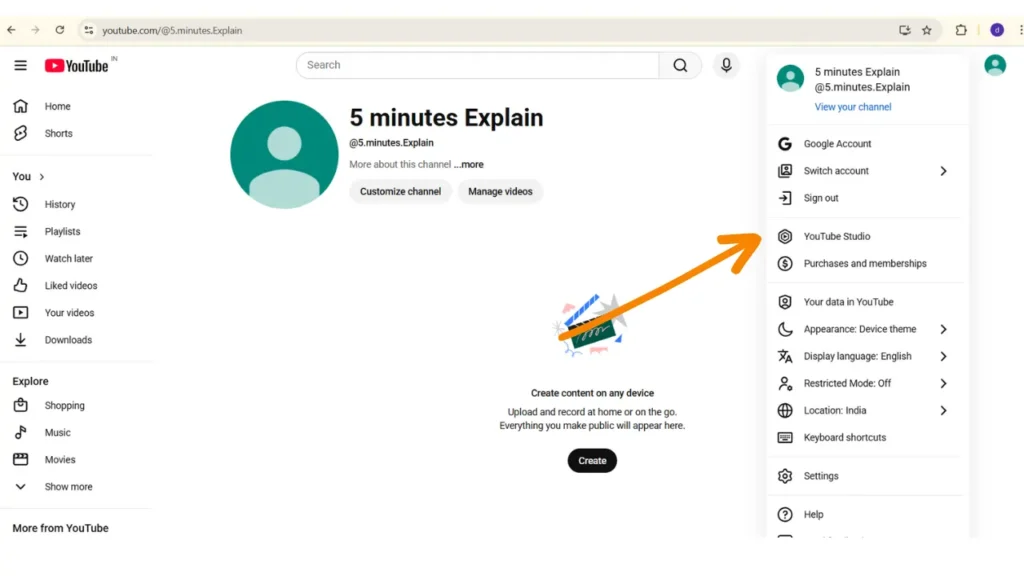
Open studio.youtube.com and sign in. Or Click on the profile picture showing on the right side.
Now click on the Youtube Studio
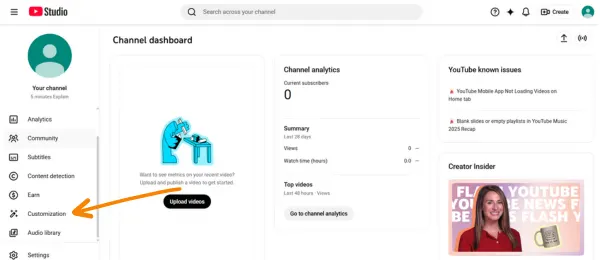
Go to the left menu and click Customization.
Under Profile Picture, click Change
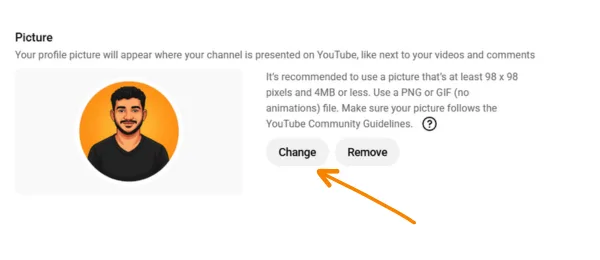
Upload the new image
Adjust the crop and click Done, then Publish
Requirements before uploading a new logo
Before uploading, make sure your image:
- Is a square (1:1 aspect ratio).
- Has a recommended size of 800 × 800 px.
- Is under 4 MB for smooth upload.
Is in JPG, PNG, GIF or BMP format.
Why Need to Change YouTube Logo
Build or refresh channel branding
Your logo is a major part of your YouTube identity. It shows up next to your channel name and helps viewers instantly recognize your content. Updating it improves your branding and makes your channel look more modern or more aligned with your content style. (Source: navigatevideo.com)
Improve recognizability across devices
YouTube displays your logo in many places—home feed, comments, search results, and video watch pages. A clear and updated logo helps viewers identify your channel faster, especially on mobile where the icon appears small. (Source: navigatevideo.com)
Reflect changes in niche or content direction
If you change your niche or your channel evolves, updating your logo helps you stay consistent with your new theme. YouTube also allows creators to change their profile picture without changing their Google account photo, making rebranding easier. (Source: engadget.com)
YouTube Channel Logo Size
To avoid quality issues, YouTube recommends specific sizes for channel icons.
Recommended dimensions for YouTube channel icon
YouTube suggests uploading a profile picture that is 800 × 800 pixels.
This keeps your logo sharp on all screen sizes. (Source: adobe.com)
YouTube may display it as small as 98 × 98 px, so avoid tiny text or overly detailed images. (Source: capcut.com)
How YouTube crops and displays the logo
Even though you upload a square photo, YouTube displays your icon as a circle on most screens.
So, always keep important elements (like face, logo, initials, or symbols) centered to avoid cropping. (Source: adobe.com)
Supported image formats and file size limits
YouTube accepts:
- JPG
- PNG
- BMP
- GIF (non-animated)
Try to keep the image under 4 MB to avoid upload errors.
Tips to Create Best YouTube Channel Logo
A good YouTube logo helps viewers recognize your brand instantly and makes your channel look professional.
Keep the logo simple and easy to recognize
Since YouTube shows your logo in a small circle, simple designs work best.
Avoid too much text or tiny details. (Source: navigatevideo.com)
Logos with clean shapes, bold colors, or initials are easier to recognize on mobile.
Design for circular crop and small-screen visibility
Because YouTube displays the icon as a circle, always keep your main design element centered.
Ensure it still looks good even when reduced to a small size. (Source: navigatevideo.com, adobe.com)
Maintain consistency with your overall channel branding
Use the same colors, fonts or style across your logo, banner, and thumbnails.
Consistent branding helps viewers trust your channel and builds identity.
Final Thoughts
Changing your YouTube channel logo is easy, but choosing the right design and size is important.
A clean, high-quality logo helps your channel look professional and builds viewer trust.
Follow the recommended sizes, use supported formats, and always design with the circular crop in mind.
With a strong and clear logo, your channel will stand out across YouTube and make a better impression on new viewers.


