


How to Start a YouTube Channel — A Complete Beginner-Friendly Guide (2026)
Written by : Anubhav Singh ( Digital Marketing Consultant )
YouTube can feel overwhelming at first — but with the right approach and consistency, almost anyone can build a meaningful channel. I’ve written this guide on, How to start a Youtube channel ,as if I were mentoring a new creator. If you follow these steps and stay patient, you give yourself a real chance of success. In this article you will know about How to start a Youtube channel and earn money from it .
First Step to Start YouTube Channel
Decide the Purpose of Your Channel
Starting a YouTube channel begins long before you hit “record.” The first step is internal: decide why you’re doing this. Are you solving a problem, sharing knowledge, building a personal brand, or entertaining people? Having a clear purpose helps shape your content strategy — and keeps you focused. Without this clarity, your channel might end up scattered and unfocused.
Choose a Clear Category of Content
Pick a content category that aligns with your skills and passion — whether it’s tech reviews, cooking tutorials, motivational talks, or digital marketing tips. Staying within a focused category helps you stay consistent and makes it easier for viewers (and algorithms) to understand what your channel is about.
Identify the Audience and Their Problems
A successful channel solves problems. Ask yourself: Who are my viewers? What are they looking for? Are they beginners seeking guidance, or experienced users wanting advanced tips? By imagining their problems and how your content can offer solutions, you stay relevant and viewer-centric.
Set Short-Term and Long-Term Goals
Set actionable short-term goals (for example: upload 5 videos in the first month) and long-term goals (like reaching 1,000 subscribers). This gives you direction and motivation. Every decision — from niche to content format to schedule — becomes intentional with goals in place. Consistency and realistic expectations are key.
Create Your YouTube Channel
Sign in to Google Account
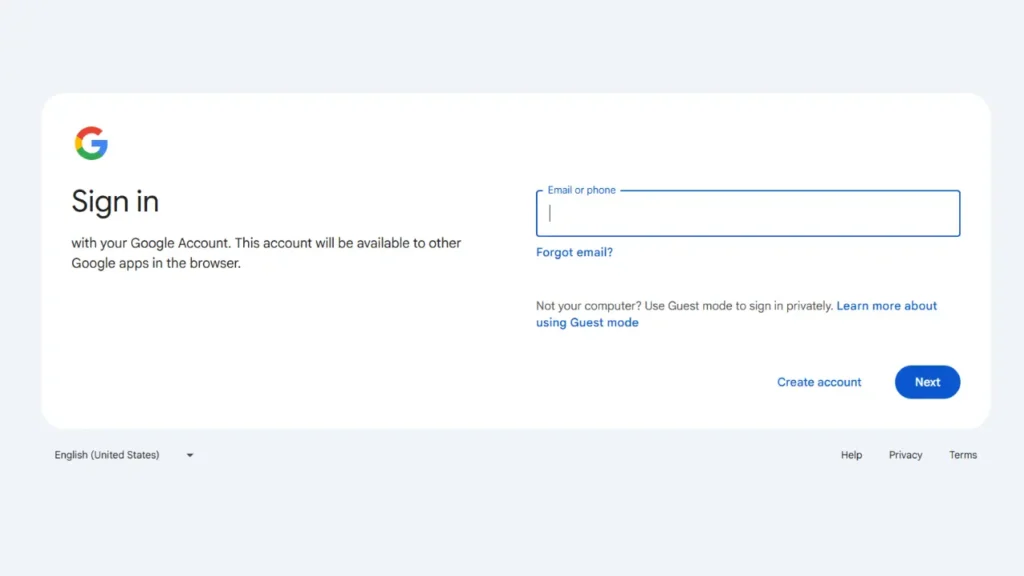
To create a YouTube channel, you first need a Google account. If you don’t have one — create it. YouTube is tied to Google, so this is necessary.
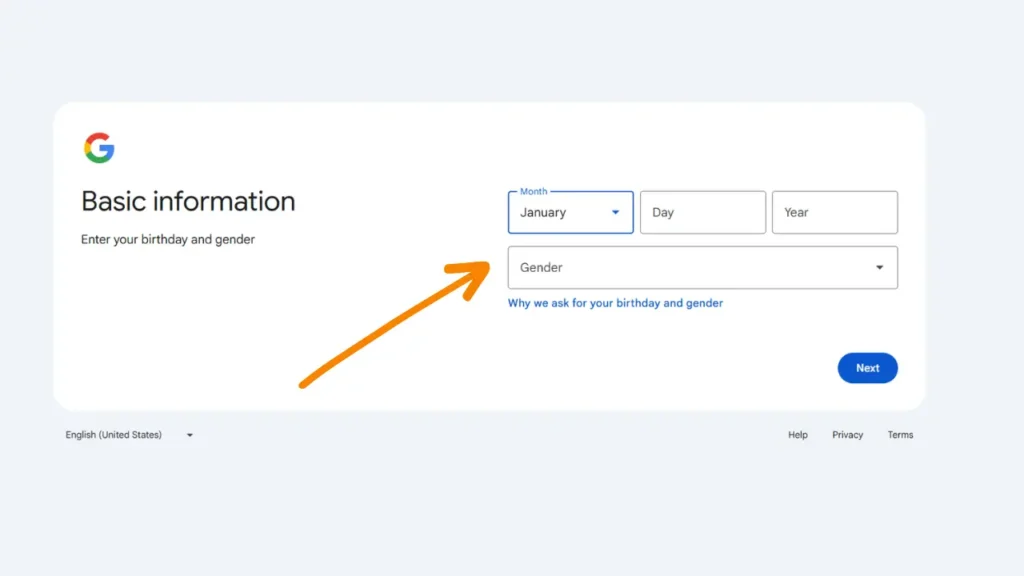
Then It will ask some basic information about you.
Create a YouTube Brand Account or Personal Channel
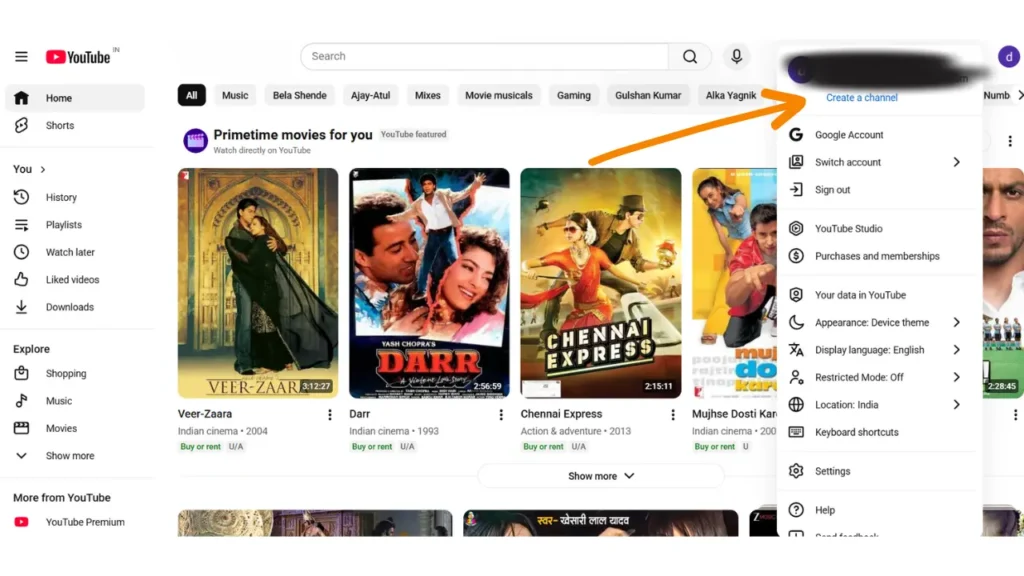
Once signed in, go to: Profile → Settings → “Add or manage channel(s)” → “Create channel.” You can create a personal channel (tied to your name) or a brand account (for a custom channel name). A brand account is especially helpful if you plan to build a brand rather than personal vlogs.
Set a Relevant and Memorable Channel Name
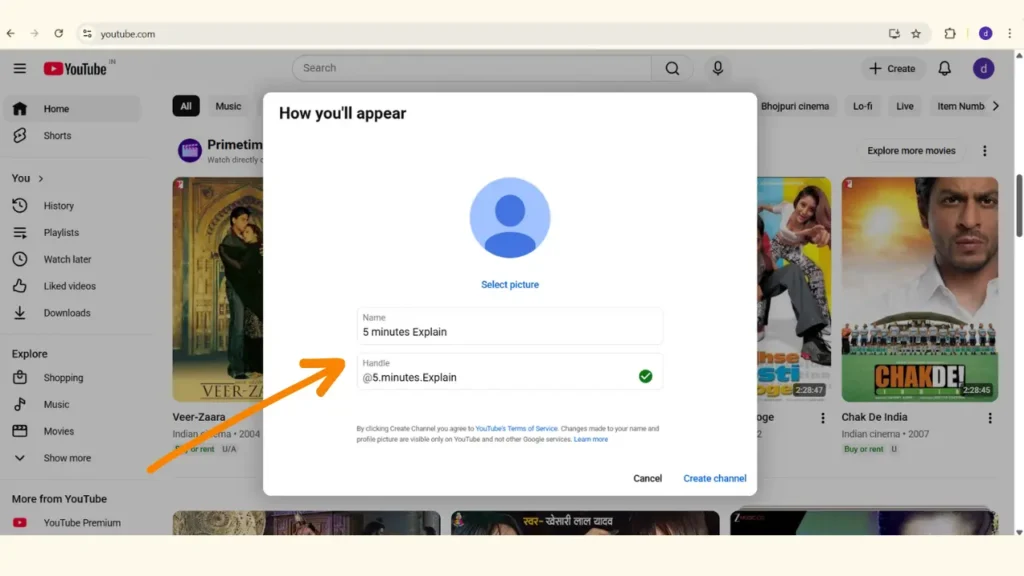
Choose a channel name that reflects your niche and is easy to search or spell. For example: “5 minutes explain” or “HomeFitnessBasics.” A clear name helps with discoverability and builds brand memory. Find 631 Youtube channel names ideas which may help you to setup Youtube channel name.
Customize Channel Layout & Branding Before Uploading
Before you upload your first video, customize your channel: add a profile picture (logo), a banner image that reflects your channel’s identity or value proposition, and set up playlists/sections if needed. This gives visitors clarity about what your channel offers from the first visit.
Optimize Your YouTube Channel
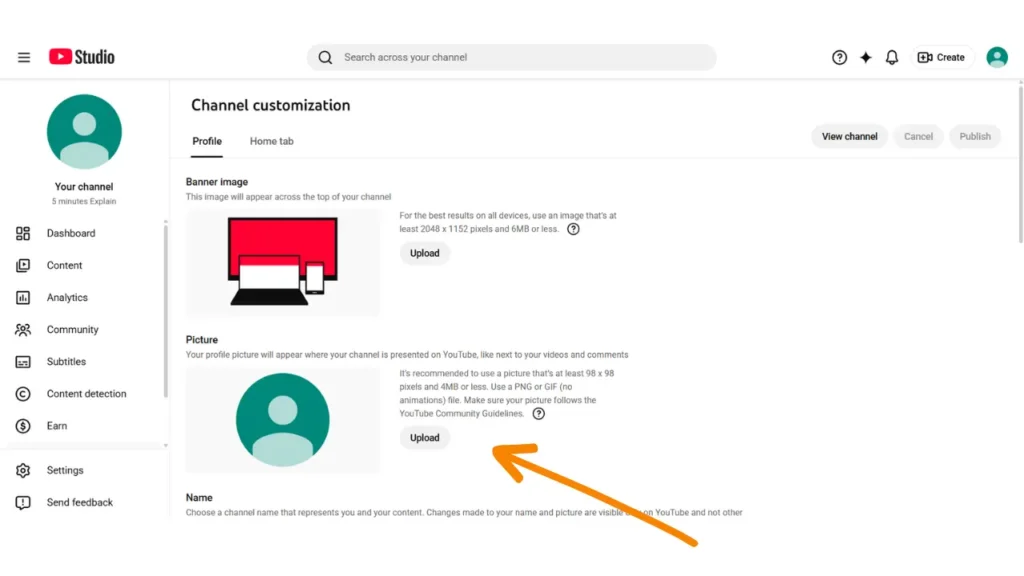
Upload a Professional Channel Logo / Profile Picture
Your channel picture serves as a face of your brand. Even a simple yet clean and relevant logo or image helps establish professionalism and trust, which increases the likelihood of viewers subscribing. Sometimes changing the logo according the trend can increase your views .
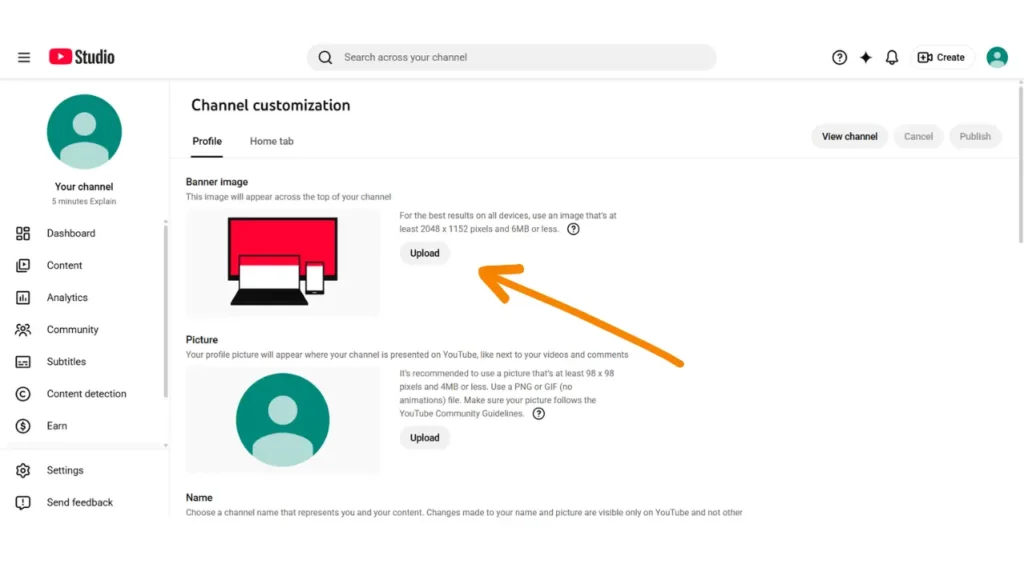
Add an Eye-Catching Channel Banner with Value Message
A banner with a clear message (e.g. “Daily Budget-Tech Reviews & Tips” / “Home-Workout for Beginners”) helps new visitors immediately understand what your channel is about. First impressions matter.
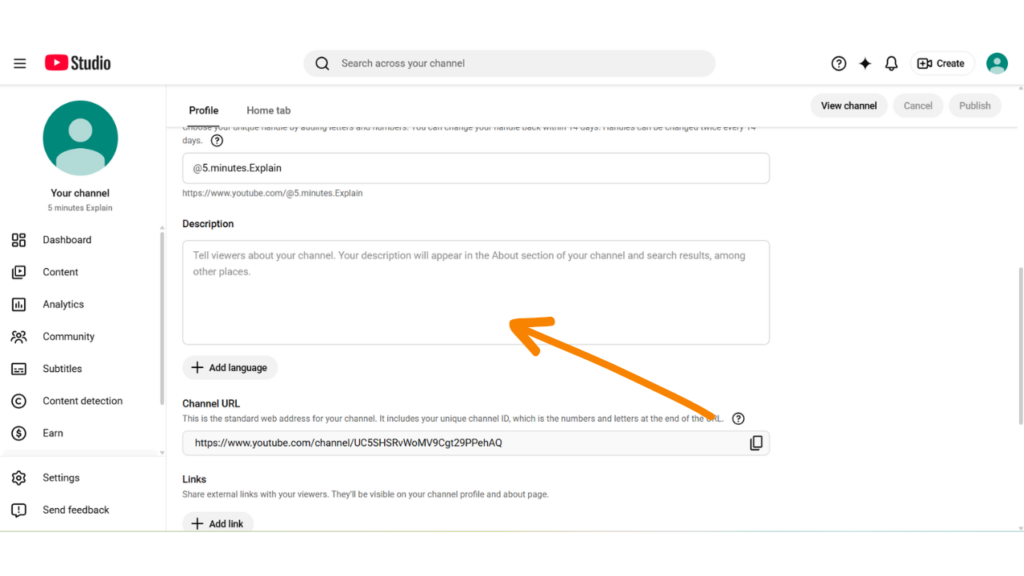
Write an SEO-Friendly Channel Description
Use keywords naturally in your channel description — but don’t overstuff. Explain who you are, what viewers can expect, and what makes your channel unique. A well-written description helps both YouTube and search engines understand your channel’s focus.
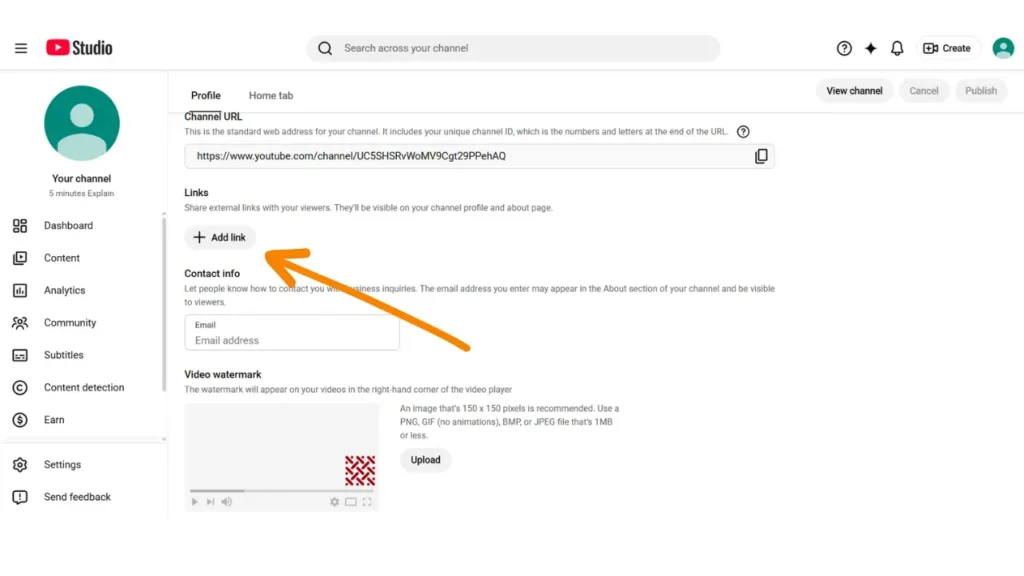
Add External Links (Website / Social Media / Contact)
Linking to your social media, website, or contact creates more credibility and offers viewers ways to connect with you. It also supports branding and professionalism.
Find Your Niche and Target Audience
Understand Problems Your Audience Needs Solved
Your niche should be more than a category — it should be a problem you solve for a specific group. For instance: “home-workout routines for beginners in small apartments” rather than just “fitness.” That clarity helps you stand out and build a loyal audience.
Research Trending Topics in Your Niche
Use YouTube’s search suggestions (autocomplete) and tools like TubeBuddy / VidIQ or even Google Trends to see what content your target audience is searching for. That informs your video ideas and ensures demand.
Evaluate Monetization Potential of the Niche
Some niches (e.g. tech reviews, educational content, finance) tend to have higher advertiser demand — which often leads to better monetization potential. Choose a niche that aligns with your passion and has potential for growth.
Consider a Sub-Niche to Avoid Over-Competition
A narrower, more focused niche reduces competition and helps you build authority faster. Overly broad niches are tempting but crowded; sub-niches give clarity and help you reach the right audience.
Find Competitors and Analyze Their Strategy
Search for Channels in Your Niche
Use YouTube to search your niche — see who appears frequently and has decent engagement. These are your real-world competitors. Observing their content helps you understand what works.
Analyze Their Video Format and Structure
See whether they use tutorials, list-based videos, reviews, face-cam, voice-overs, etc. Watch how they format content, how long videos are, how they begin (hook), pacing, thumbnail style. This helps you learn what viewers in your niche prefer.
Note Upload Frequency and Consistency
Successful channels often have a consistent upload schedule — weekly, bi-weekly, or monthly. Consistency helps build trust with viewers and signals to YouTube that the channel is active.
Study Engagement Metrics — What Works for Audience
Identify which of their videos get the highest views, likes, comments or shares. Which topics resonate? What format gets attention? Use these insights to plan your content more strategically.
Plan Your Content & Video Topics List
Create a Competitor & Topic Spreadsheet
Maintain a simple sheet listing competitor channels, their subscriber counts, their top-performing video titles, video formats, and upload frequency. This helps you spot patterns and gaps in content coverage.
Collect Best-Performing Video Titles for Inspiration
Use “Sort by popularity” on competitor channels to find their top videos. This reveals high-demand topics or pain-points your audience cares about.
Identify Common Themes Popular Among Viewers
If multiple creators consistently earn good engagement on similar topics, that shows demand. You can use that as a base for your own content — but with your own twist.
Create Unique & Improved Versions of Winning Topics
Don’t copy — build better. Use the same topic as inspiration, but add your unique style, updated information, deeper value, or local context. This helps you stand out while catering to proven demand.
Understand Different Types of Videos You Can Create
Long-Form Tutorial / Educational Videos
These work well when you aim to teach something deeply — e.g. “How to edit videos on a budget”, “Full guide to budgeting in Excel”, etc. Good value + depth helps build authority and retention.
Short-Form Content (YouTube Shorts) for Quick Engagement
Shorts are great for quick tips, teasers, highlights. They help attract new viewers fast, especially when you’re starting out and don’t yet have a deep library.
Review & Product-Comparison Videos (When Niche Allows)
If your niche involves products — like tech, tools, books — reviews and comparisons attract viewers in purchase or decision mode. They often have high search demand and potential monetization.
Reaction / Commentary / Opinion Videos (for Trends & Engagement)
Trending topics, news, reaction videos often generate high engagement: comments, shares, discussions. Good for building community and attracting attention — especially in entertainment, news, or trending niches.
Do Keyword Research for Video Topics & Titles
Use YouTube Search Suggestions (Autocomplete) to Discover Keywords
Typing partial queries into YouTube search bar shows what people commonly search for. Use those as your seed keywords — they reflect real user intent and demand.
Use Tools like TubeBuddy or VidIQ (Even Free Versions)
These tools help check search volume, competition, related tags — giving insight on what topics are easier to rank for, which are high-demand, and which are over-saturated.
Use Google Trends for Topic Demand and Seasonality
Some topics have seasonal or trending spikes. Google Trends helps you see whether interest is rising or falling — useful to plan timely content or evergreen content.
Organize Keywords by Search Intent and Difficulty
Not every keyword is equal — classify them by intent (informational, review, how-to, purchase) and difficulty (low/medium/high competition). Prioritize long-tail, moderate difficulty keywords for easier ranking and niche reach.
Use Simple Equipment — No Need for Expensive Gear Initially
Start with a Smartphone or Entry-Level Camera
Many successful YouTubers began with just a smartphone. Modern phones record high-quality video sufficient for most content.
Use a Tripod or Stand for Stable Shots
Shaky videos look unprofessional and discourage viewers. A simple tripod or stand ensures stability and better viewing experience.
Use an External Microphone for Clear Audio
Audio clarity matters even more than video quality. Bad audio often drives viewers away — so investing in a decent mic early is often smarter than an expensive camera.
Ensure Good Lighting — Even Natural Light Works
Well-lit videos look professional. Natural window light or simple lamps can make a big difference compared to dim or uneven lighting.
Create Videos: Faceless (Voice-over) or Face-cam — Choose What Fits You
Record Voice-overs / Screen Recording for Faceless Videos
If you’re not comfortable being on-camera, use voice-overs, screen recordings, slideshows, stock footage, or animations. This style works especially well for tutorials, listicles, or informational content.
Use Stock Footage / Animations / Slides Where Relevant
Stock clips or simple animated slides can make content dynamic and interesting, even without face presence — good for explanation, storytelling, or data-based videos.
Use Face-cam with Tripod, Mic & Good Lighting for On-Camera Videos
If you choose on-camera videos, make sure you have stable camera setup, clear audio, and decent lighting. Use a script or outline to stay structured and avoid long pauses or mistakes.
Script & Storyboard Before Recording to Maintain Flow
Planning your content before recording helps avoid mistakes, reduces editing time, and ensures a smooth, engaging flow — better for viewer retention and overall quality.
Edit Your Videos with Care — Polish Makes a Big Difference
Remove Mistakes, Long Pauses & Unnecessary Portions
Trim out filler, redundant parts, and mistakes. A tight, concise video keeps viewers engaged — unnecessary drag can cause drop-offs, hurting watch time.
Add Background Music & Sound Effects (Subtle & Balanced)
Background music and light effects enhance professionalism — but ensure your voice remains clear. Music should be balanced so it doesn’t overpower your narration or distract.
Insert Subtitles / Text Overlays for Clarity & Accessibility
Subtitles increase accessibility (for viewers with no audio), help retention, and boost engagement — especially for educational or information-rich videos.
Start with a Strong Hook (First 15–30 Seconds) to Grab Attention
Use an engaging intro — something that instantly communicates value or teases the outcome. First few seconds are crucial; many viewers decide whether to continue or leave during this time.
Uploading Your First Video — Metadata & Details Matter
Write an SEO-Optimized Title with Target Keyword & Benefit
A clear title tells both YouTube and viewers exactly what they will get. Use your target keyword naturally and convey the benefit (e.g. “How to Edit Videos on Smartphone – Step by Step”).
Craft a Detailed Description with Keywords, Links & Summary
Write a description summarizing the video’s content, include your keywords naturally, add resource links (your socials, related content), timestamps (if long video), and external links if relevant. This helps both SEO and user experience.
Add Relevant Tags & Hashtags for Context & Discoverability
Use a mix of general and specific tags to help YouTube categorize your video — useful when topics overlap. Hashtags in the description can also support visibility on trending or niche topics.
Choose Correct Category, Language & Playlist (If Applicable)
When uploading, set appropriate category (e.g. Education, Tech), language, and if content fits — add to a playlist. This ensures your video is correctly classified and helps reach the right audience.
YouTube Video Optimization (YouTube SEO) — Make Your Videos Discoverable
Design Attractive, High-CTR Thumbnails
Your thumbnail is like the book cover — first look matters. Clean visuals, bold text/highlights, clarity and promise of value help persuade clicks. Good thumbnails encourage higher Click-Through Rate (CTR), which signals value to YouTube.
Avoid misleading thumbnails — clickbait may get clicks, but if viewers leave quickly, watch time and retention suffer. Always align thumbnail with actual content.
Write SEO-Friendly Titles & Descriptions
Titles should be clear, concise, and promise a benefit. Titles around 50–60 characters perform well, avoiding cut-offs in search results. Descriptions should summarize what viewers will learn, include keywords naturally, and provide value — increasing chances of clicks.
Descriptions also help search engines / YouTube understand your content — though it’s not guaranteed your description appears in SERPs.
Use Relevant Tags & Hashtags as Context Signals
Though tags/hastags aren’t primary ranking factors, they help YouTube understand video context — especially for ambiguous or overlapping topics. A mix of broad and specific tags increases discoverability.
Optimize for Watch-Time, Retention & Engagement Signals
YouTube values how viewers engage with your video: watch time, retention, likes/comments/shares. Strong hooking intros, good pacing, subtitles, clear value, and encouraging interaction help. Good engagement increases chances of being surfaced in search and recommendations.
How to Earn Money From YouTube Videos — Monetization & Growth Strategy
Understand the YouTube Partner Program (YPP) & Its Requirements
To monetize via ads, you must meet eligibility — typically including 1,000 subscribers and 4,000 valid public watch hours over the past 12 months. Also, your content must comply with policies, and your account should follow security requirements.
Link a Valid Ad Account & Maintain Ad-Friendly Content
Once eligible, link an approved ad account (e.g. AdSense) to receive ad revenue. Upload content that adheres to community and advertiser-friendly guidelines to avoid demonetization or limited ads.
Recognize That Niche, Audience & Content Quality Affect Revenue
Ad rates vary by niche and viewer demographics. Niches like tech, finance, education often have higher advertiser demand — meaning potential for better revenue. High-quality, valuable content + appropriate niche = better long-term income potential.
Explore Additional Monetization Streams Beyond Ads
Ads are not the only revenue source. As your audience grows, consider sponsorships, affiliate marketing, selling digital products / services, memberships, or other monetization methods — especially if your content builds trust and authority.
Understanding How YouTube Works — Algorithm, Recommendations & Growth Strategy
Know the Basics of YouTube Recommendation & Search Algorithm (2025)
YouTube isn’t just chronological — it’s a smart recommendation engine. It prioritizes videos based on viewer behavior: watch time, engagement, session duration, viewer interests, and more. What shows up for one user may differ for another.
So your aim should be two-fold: optimize for search (SEO: correct keywords, titles, metadata) and optimize for recommendations (engaging content, retention, audience satisfaction).
Prioritize Consistency and Quality Over Frequency
A consistent upload schedule combined with quality content builds trust with both viewers and the algorithm. Rather than uploading frequently with weak content, focus on creating fewer but high-value videos. Reliable value over time brings better growth.
Optimize for Both Search and Suggested Video Traffic
Search helps new audiences discover you; suggested videos (recommendations) can explode your channel growth. Use SEO best practices for search — and focus on engagement/retention for suggestion feed success.
Stay Compliant — Follow Community & Advertiser Guidelines
Avoid clickbait, misleading thumbnails, reused content without value addition, or policy-violating content. This protects your channel from demonetization or strikes, and builds trust with both viewers and advertisers — important for long-term success.
How to Get More Views on YouTube — Growth Strategy & Viewer Psychology
Think Like a Viewer — Solve Problems & Deliver Value
Your content should answer real questions, solve real problems, or provide genuine value. When you prioritize viewer benefit over “just making videos,” your content becomes more meaningful and share-worthy. That builds trust, loyalty, and organic growth.
Learn from Competitors — Then Improve & Differentiate
Study what successful channels are doing: topics, format, video style, thumbnails, pacing, engagement. Use those insights — but add your own unique angle: better explanations, updated info, personal style, local context (if relevant).
Optimize Thumbnails, Hooks, Pacing & Storytelling for Engagement
First impressions count — thumbnail + title + hook decide click and watch. After click, keep pacing snappy, avoid fluff, deliver promised value, and structure content for clarity and retention. Good storytelling and presentation increase watch time — which boosts reach.
Encourage Engagement — Comments, Shares, Subscriptions & Playlists
Encourage viewers to like, comment, share, subscribe, or watch another video. Use end-screens or playlists to guide them to more content. Engagement and longer session times send positive signals to YouTube’s algorithm and help your channel grow.
FAQs
To get paid, you need to (1) create a YouTube channel, (2) upload original videos consistently, and (3) become eligible for monetization through the YouTube Partner Program (YPP).
You start earning money once you meet the monetization criteria and get accepted into YPP. Monetization can then come from ads, affiliate marketing, sponsorships, channel memberships, and more.
Choose a niche based on these three factors:
Your interest/expertise (you should enjoy creating the content)
Audience demand (people must be searching for this type of content)
Monetization potential (some niches earn more through ads & sponsors)
Pick a niche you can create long-term content for without getting bored.
Yes — for ad monetization, you must meet the YouTube Partner Program requirements, which (for most creators) include:
🔹 1,000 subscribers and
🔹 4,000 valid public watch hours in the last 12 months
OR
🔹 1,000 subscribers + 10 million valid public Shorts views in the last 90 days.
You gain subscribers by focusing on valuable content, consistency, and discoverability:
- Publish videos that solve viewers’ problems
- Use searchable keywords and attractive thumbnails
- Add strong hooks & good pacing to retain viewers
Encourage viewers to subscribe at natural moments in the video
Channels that upload consistently + with SEO typically grow faster.
Starting a channel is free.
You don’t have to buy expensive equipment — many creators begin with:
- A smartphone camera
- Free editing apps
Natural lighting
As you grow, you can upgrade equipment, but it’s not required to start earning
No — YouTube does not pay based on subscriber count alone.
You start earning after joining the YouTube Partner Program, which requires 1,000 subscribers + 4,000 watch hours (or 10M Shorts views).
However, even before monetization, you can still earn via affiliate marketing or brand deals if your channel has engaged viewers.
Creators use different income methods, and your earnings depend on views, niche, and engagement. Ways YouTubers commonly make ₹2,000 daily:
🔸 Ad revenue (after monetization)
🔸 Affiliate marketing (promoting products)
🔸 Sponsorships and paid reviews
🔸 Selling digital products / services
Even channels with low views but high-value niche (finance/tech/education) often reach this income faster than entertainment niches.
YouTube earnings vary by niche and audience country. Average estimates from creators globally are around:
📌 $0.50 to $6 per 1,000 views
Finance, tech, and business niches typically earn more, while entertainment and memes earn less. This is only a rough range — income depends on advertiser demand in your niche.
The first 30 seconds of a video strongly influence viewer retention, which affects performance in the algorithm.
If many viewers leave early, YouTube assumes the video wasn’t satisfying and reduces its reach.
Creators use the first 30 seconds to:
- Create a strong hook
- Tell viewers what they’ll gain from the video
Avoid long intros and unnecessary buildup